The S3 Bucket Policy Problem
Every object in an S3 bucket is governed, in part, by exactly one bucket policy, a single JSON document attached to the bucket. Before access points existed, every application and every team that needed access to a shared bucket had to be granted permission inside that one document. Two hard limits made that unworkable once more than a few consumers were involved:
- Size AWS caps bucket policies at 20 KB. That sounds generous until a dozen teams each need a few statements with conditions, principals, and prefixes. Once you’re close to the limit, adding the next team means trimming or restructuring someone else’s statements just to make room.
- Blast radius, one shared document means one shared risk. A typo in the statement for Team C’s access can silently break Team A’s access, or worse, open Team A’s data to Team C. Nobody wants to be the one who edits the policy, so the bucket policy calcifies into something everyone is afraid to touch. AWS’s own launch post makes a narrower complexity argument instead, that managing “a single and possibly complex policy” doesn’t scale, without describing this exact failure mode.
This is the problem AWS built S3 access points to solve, launching them at re:Invent 2019. Instead of one 20 KB document trying to serve fifty consumers, each consumer gets its own access point with its own resource policy and its own 20 KB budget. Editing one team’s access point policy cannot break another team’s, because they are different resources entirely.
That fix has a blind spot, each access point’s policy lives in whichever account owns that access point, and an access point does not have to be owned by the bucket’s own account. That means a bucket owner can end up trusting a policy document whose edits they will never see.
How S3 Access Points Work
An S3 access point is a named endpoint attached to a bucket, with its own resource policy. Each access point is a distinct addressable resource layered in front of the same bucket, each one carries its own resource policy, its own hostname, and its own network-origin restriction, while the underlying bucket stays the same.
At its core, an access point is a separate, named resource that sits in front of a bucket. Instead of adding one more statement to the bucket’s own policy, you create an access point, attach a small policy to it, and point callers at that instead of the bucket directly. The bucket owner still owns the data, but the decision of who gets through a given access point can live in its own, independent policy document, owned by whichever account created that access point.
One point matters more than the rest, an access point’s owning account and the bucket’s owning account don’t have to be the same account. Configuration-wise, an access point looks a lot like a bucket. It gets its own name, its own ARN, a network origin setting (Internet or VPC), its own Public Access Block configuration, and its own resource policy of up to 20 KB. It also gets an auto-generated alias, in the form <access-point-name>-<random-id>-s3alias, for example study-ap-gb3qyy9zymfx1pfnpb1b77yr1z1inuse1a-s3alias. That alias lets the access point act as a drop-in stand-in for a bucket name in any tool or API call that only knows how to address a bucket, without those tools needing to understand ARNs at all. Access points are managed through s3control, a control plane separate from the bucket’s s3 API, so they generate different CloudTrail event names and use a different service endpoint than the ones bucket tooling watches.
A regular bucket URL looks like https://{bucket}.s3.{region}.amazonaws.com/{key}. An access point’s actual URL swaps in its own hostname instead, https://{name}-{account-id}.s3-accesspoint.{region}.amazonaws.com/{key} (per AWS’s reference).
Put the naming and the hostname together and here’s what a request passes through, the caller addresses the access point directly, using its own name and hostname, and the access point’s own policy is what decides whether the request continues on to the bucket behind it.
flowchart LR
    Caller["Caller"] --> AP["Access point\nown name, own ARN,\nown hostname,\nown resource policy"]
    AP --> Bucket[(S3\n Bucket)]
Scale that up to several consumers sharing one bucket, and each gets its own access point instead of its own line in the bucket’s policy.
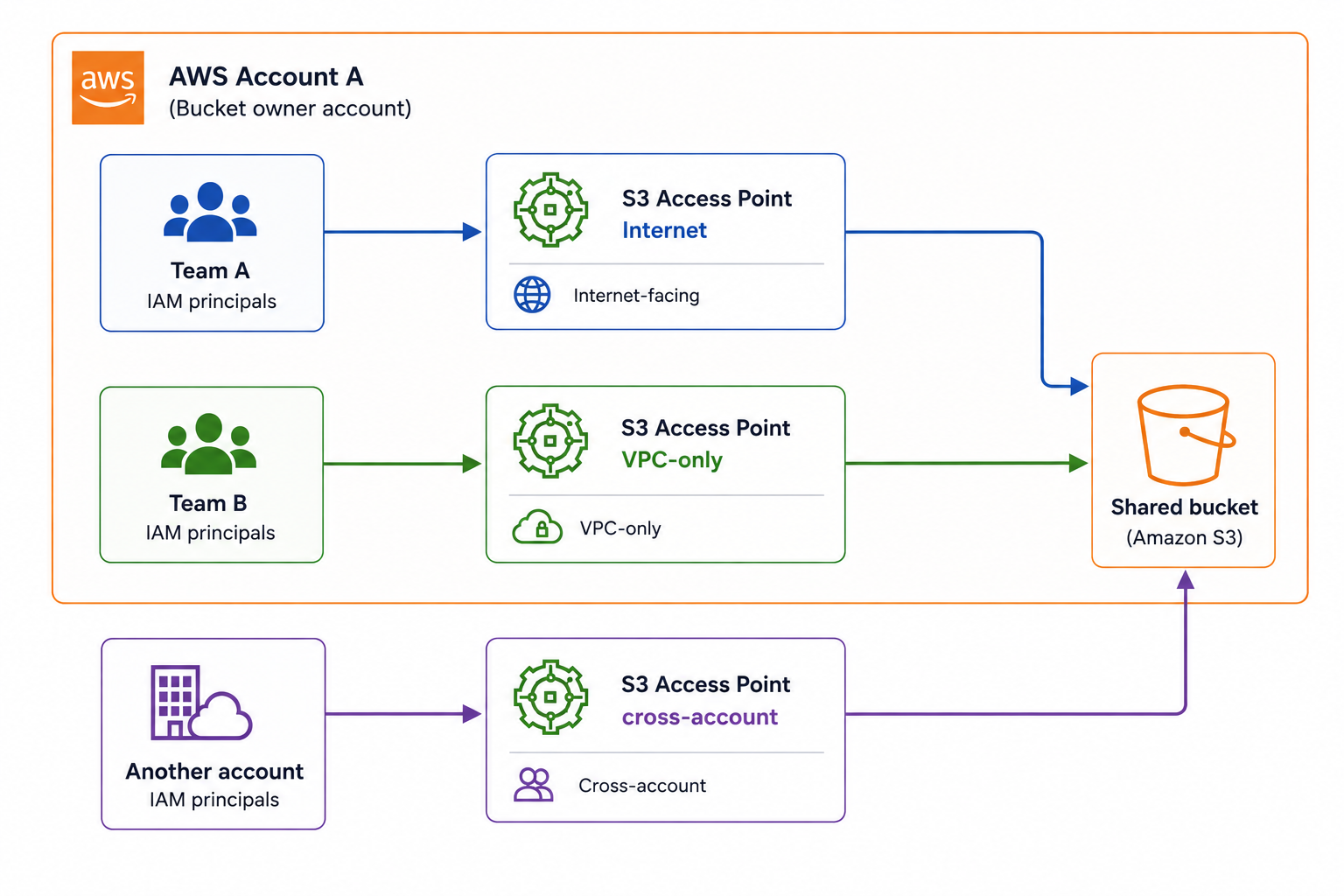
Three consumers, three independently managed policies, one bucket policy that only has to say “trust these access points,” not “here is a bespoke statement for every one of these three parties.” Team A and Team B sit inside the bucket owner’s own account. The third access point doesn’t, it’s cross-account, owned entirely by another AWS account.
Before adding any bucket policy at all, here’s what the three paths in the diagram above do against a bucket left at AWS defaults, Block Public Access fully on with all four settings (BlockPublicAcls, IgnorePublicAcls, BlockPublicPolicy, and RestrictPublicBuckets, each one closes off a different way a bucket or its objects could end up public), and no bucket policy attached at all.
What a Request Actually Looks Like
Everything so far describes an access point as a routing layer in the abstract. Here’s what that changes at the HTTP level, full request and full response, not just the URL. botocore’s own DEBUG logger dumps exactly that.
import logging
import boto3

boto3.set_stream_logger("", logging.DEBUG)

s3 = boto3.client("s3", region_name="us-east-1")
s3.get_object(Bucket="<bucket>", Key="report.csv")
Captured against a real bucket, the request botocore sends looks like this:
GET https://<bucket>.s3.amazonaws.com/report.csv
Host: <bucket>.s3.amazonaws.com
x-amz-checksum-mode: ENABLED
User-Agent: Boto3/1.40.55 md/Botocore#1.40.55 ua/2.1 os/macos#25.5.0 md/arch#arm64 lang/python#3.13.2 md/pyimpl#CPython
X-Amz-Date: 20260802T042330Z
X-Amz-Content-SHA256: e3b0c44298fc1c149afbf4c8996fb92427ae41e4649b934ca495991b7852b855
Authorization: AWS4-HMAC-SHA256 Credential=<redacted>/20260802/us-east-1/s3/aws4_request, SignedHeaders=host;x-amz-checksum-mode;x-amz-content-sha256;x-amz-date, Signature=<redacted>
And the response headers that came back:
HTTP 200
x-amz-id-2: ZpupXxaXiCGv4s6jVw4/OHCqr/hVSp/RqKUlfapeYWTSXoTir0w7dOuellQd5xKKbe2rJgNqkKw=
x-amz-request-id: AS3FB2Y68WXYK0K5
Date: Sun, 02 Aug 2026 04:23:32 GMT
Last-Modified: Sun, 02 Aug 2026 04:21:31 GMT
ETag: "115945dd0a1a5b6b23f21f28be3bb1a4"
x-amz-checksum-crc64nvme: V0oMetU+CJk=
x-amz-checksum-type: FULL_OBJECT
x-amz-server-side-encryption: AES256
Accept-Ranges: bytes
Content-Type: binary/octet-stream
Content-Length: 38
Server: AmazonS3
One thing to notice before the comparison, the direct-bucket hostname is <bucket>.s3.amazonaws.com, with no region segment at all. That’s a us-east-1-specific legacy quirk, the classic global S3 endpoint. Other regions do carry the region in the hostname, matching the general pattern described earlier.
Swap the Bucket argument for the access point’s ARN and nothing else in the call changes:
s3.get_object(
    Bucket="arn:aws:s3:us-east-1:<account-id>:accesspoint/s3ap-blog-trace-ap",
    Key="report.csv",
)
GET https://s3ap-blog-trace-ap-<account-id>.s3-accesspoint.us-east-1.amazonaws.com/report.csv
Host: s3ap-blog-trace-ap-<account-id>.s3-accesspoint.us-east-1.amazonaws.com
x-amz-checksum-mode: ENABLED
User-Agent: Boto3/1.40.55 md/Botocore#1.40.55 ua/2.1 os/macos#25.5.0 md/arch#arm64 lang/python#3.13.2 md/pyimpl#CPython
X-Amz-Date: 20260802T042355Z
X-Amz-Content-SHA256: e3b0c44298fc1c149afbf4c8996fb92427ae41e4649b934ca495991b7852b855
Authorization: AWS4-HMAC-SHA256 Credential=<redacted>/20260802/us-east-1/s3/aws4_request, SignedHeaders=host;x-amz-checksum-mode;x-amz-content-sha256;x-amz-date, Signature=<redacted>HTTP 200
x-amz-id-2: ijJfxlTlDsWRC1aPtewU1xqYdVWA8GNaY0wLFAXIXZER/NuRj39ORIn1b/gVfClsfN/kVYwH0P95mo9YrXbRHzcxL1IQwyal
x-amz-request-id: YQAE65QXDAAB1FQ7
Date: Sun, 02 Aug 2026 04:23:57 GMT
Last-Modified: Sun, 02 Aug 2026 04:21:31 GMT
ETag: "115945dd0a1a5b6b23f21f28be3bb1a4"
x-amz-checksum-crc64nvme: V0oMetU+CJk=
x-amz-checksum-type: FULL_OBJECT
x-amz-server-side-encryption: AES256
Accept-Ranges: bytes
Content-Type: binary/octet-stream
Content-Length: 38
Server: AmazonS3Line for line, the two requests and the two responses are the same except for one thing, the Host header. SignedHeaders still includes host, so that Host value is baked into the signature too, boto3 works out the right hostname for the access point ARN on its own, before it ever signs or sends anything. The client never puts an ARN on the wire, S3 never even sees the ARN, it just sees whichever hostname the request landed on. Everything that happens after this, IAM checks, bucket policy checks, the s3:DataAccessPointAccount condition, all of it is decided by which hostname the request came in on, not by anything the caller typed or declared.
There’s a third way to call the same access point, its auto-generated alias, and it behaves differently again. Using the alias from earlier in this post as the Bucket value:
s3.get_object(
    Bucket="s3ap-blog-trace-ap-34aexrwceietbq8zd8j77efgffu61use1a-s3alias",
    Key="report.csv",
)
GET https://s3ap-blog-trace-ap-34aexrwceietbq8zd8j77efgffu61use1a-s3alias.s3.amazonaws.com/report.csv
Host: s3ap-blog-trace-ap-34aexrwceietbq8zd8j77efgffu61use1a-s3alias.s3.amazonaws.comNo s3-accesspoint anywhere in that hostname. It’s built exactly the same way a plain bucket request is built, <name>.s3.amazonaws.com, just with the alias standing in for the bucket name. Calling by ARN and calling by alias produce two different-looking requests on the wire, s3-accesspoint hostname for the ARN, ordinary-looking s3 hostname for the alias, but S3 routes both to the same access point behind the scenes.
Network Origin
Every access point is created with a network origin setting, and it only takes one of two values, Internet or VPC, chosen once at creation time. An Internet access point accepts requests from anywhere, a VPC access point only accepts requests that physically originate from its configured VPC, rejecting everything else before any identity or resource policy is checked at all. The two sections below walk through what each one does in practice.
Internet-facing
Imagine team-a-analyst, an IAM user in the bucket’s own account. Its identity policy grants s3:GetObject only on the access point’s ARN. The access point itself carries no resource policy of its own and has a network origin of Internet, so it accepts requests from anywhere. The access point also gets an auto-generated alias, like team-a-access-point-smgtpari4twxzdp7hwsgze1gexhnwuse1a-s3alias, which resolves to that same access point, and you can use it directly as the bucket name in the AWS CLI.
With no bucket policy in the picture at all, everything comes down to team-a-analyst’s own identity policy. Its Resource field names both the bucket’s ARN and the access point’s ARN, and both have to be there, naming just one or the other was tested separately and denied both times. Caller and bucket sit in the same account too, so there’s no second, cross-account check to clear. Nothing else stands in the way, and the object comes back. A same-account access point works without any bucket policy at all, as long as the identity policy names both the bucket’s ARN and the access point’s ARN it will be addressed through.
Stated plainly, since it’s easy to read too much into s3:CreateAccessPoint later on, using an access point does not bypass s3:GetObject, s3:PutObject, or any other *Object permission. s3:CreateAccessPoint is a control-plane action, managing the access point resource itself, and it grants zero data-plane access on its own. The dual-ARN requirement above is stricter than it first looks too, a same-account identity needs GetObject on both the bucket’s ARN and the access point’s ARN together. Tested directly, the access point’s ARN alone, exact or wildcarded, was denied every time.
flowchart TB
    subgraph acct["Bucket owner account"]
    C1(["team-a-analyst"])
    end
    C1 --> N1["Request origin matches\nAP network config?"]
    N1 -- no --> D0[["Denied"]]
    N1 -- yes --> I1["Identity policy Resource\nnames AP ARN?"]
    I1 -- no --> D1[["Denied"]]
    I1 -- yes --> A1["Caller and bucket\nsame account?"]
    A1 -- yes --> O1[(Object returned)]
    A1 -- no --> D2[["Denied\nneeds cross-account check"]]
VPC-only
team-b-analyst carries the same shape of identity policy as team-a-analyst, s3:GetObject scoped to its own access point’s ARN, nothing more. What changes this time sits on the access point’s side, not the identity’s. team-b-access-point was created with its network origin locked to VPC, tied to the account’s default VPC, so a request has to physically originate from inside that network before anything else about it gets checked. The command below runs from a local machine, well outside that VPC.
aws s3api get-object --bucket arn:aws:s3:us-east-1:108304870076:accesspoint/team-b-access-point --key report.csvAn error occurred (AccessDenied) when calling the GetObject operation: User: arn:aws:iam::108304870076:user/team-b-analyst is not authorized to perform: s3:GetObject on resource: "arn:aws:s3:us-east-1:108304870076:accesspoint/team-b-access-point/object/report.csv" with an explicit deny in a resource-based policyBefore IAM or any bucket policy gets a say, the access point itself checks where the request physically originated against its own configured network origin, VPC. The request in this case came from outside AWS’s network entirely, so that check fails on its own, before identity or resource policies are even consulted. AWS reports this as AccessDenied: explicit deny in a resource-based policy, which is easy to misread as the bucket’s policy having blocked it. This bucket has no policy at all, so that reading is wrong. What’s really happening is that the access point’s network-origin restriction behaves like a built-in, structural deny, enforced by the access point itself rather than expressed anywhere as a JSON statement a person could go read. Because that check fails first, whether team-b-analyst’s identity policy would otherwise have been sufficient never gets tested here, the request never reaches that stage of evaluation.
The pattern holds well beyond this one test. explicit deny in a resource-based policy can mean exactly what it says, or it can mean a network-origin mismatch with no resource-based policy involved anywhere, and the same wording covers both. Whether a request originates inside the right network is its own axis of access control, separate from whatever policy documents exist, and checking it directly beats assuming from the error text alone.
flowchart TB
    subgraph acct2["Bucket owner account"]
    C2(["team-b-analyst"])
    end
    C2 --> N2["Request origin matches\nAP network config?"]
    N2 -- no --> D2a[["Denied\nimplicit deny in AP"]]
    N2 -- yes --> I2["Identity policy Resource\nnames AP ARN?"]
    I2 -- no --> D2b[["Denied"]]
    I2 -- yes --> A2["Caller and bucket\nsame account?"]
    A2 -- yes --> O2[(Object returned)]
    A2 -- no --> D2c[["Denied\nneeds cross-account check"]]
Cross-account
This one crosses an actual account boundary. acme-analyst lives in a completely separate AWS account, 486678742555, created specifically for this test, and its identity policy is about as generous as one gets, the AWS-managed AdministratorAccess policy, s3:* on every resource, not a narrow custom grant. The access point it uses, acme-analytics-access-point, is owned by that same external account and points at a bucket sitting in someone else’s account entirely.
The access point itself is correctly configured and genuinely cross-account, and acme-analyst’s AdministratorAccess policy clears the trusted-account half of the cross-account check about as trivially as an identity policy can, full account admin, not a narrowly scoped grant. But acme-analyst’s account (486678742555) is a different account from the bucket’s (108304870076), which makes this a real cross-account request, and that means a second, independent evaluation has to pass on the trusting account’s side too. Nothing supplies that second Allow. The bucket owner’s account contains no resource-based policy anywhere that names this external account or this access point, so AWS reports AccessDenied: no resource-based policy allows the s3:GetObject action, the identical error a narrowly scoped identity produced in an earlier pass of this same test. Full administrative privilege in the caller’s own account buys nothing here. This is the exact “before” state a delegation policy exists to override, an identity that’s otherwise fully capable, blocked purely because the bucket owner never granted it anything.
This is the two-account evaluation rule from earlier, playing out with no delegation in place. AWS checks the trusted account (acme-analyst’s own) and the trusting account (the bucket owner’s) independently, and needs an Allow from both. AdministratorAccess settles the trusted-account side instantly, since there’s no action it doesn’t permit. The trusting-account side asks a different question. Does any resource-based policy in 108304870076 name acme-analyst, their account, or their access point? It doesn’t, not anywhere. One side returning Allow while the other returns nothing isn’t enough, whether the caller is narrowly scoped or a full administrator makes no difference. no resource-based policy allows the s3:GetObject action is AWS describing that missing second half specifically. It has nothing to do with what the caller is permitted to do in their own account.
Fixing this takes exactly one change, and it belongs entirely to the bucket owner, not the caller. A bucket policy statement naming acme-analyst’s account, or scoping a Principal:* grant with a Condition on s3:DataAccessPointAccount equal to 486678742555, supplies the missing resource-based Allow. Nothing about acme-analyst’s own identity policy needs to change at all, AdministratorAccess already clears its half on its own. This is the same mechanism AWS documents for cross-account resource access generally, in Cross-account policy evaluation logic. The trusted account’s identity policy and the trusting account’s resource-based policy are evaluated independently, and both have to return Allow before the request is granted. None of this is specific to s3:GetObject. The same two-account rule applies to whatever S3 action is being requested, PutObject, DeleteObject, ListBucket, any of them, since it’s a property of how cross-account authorization works generally, not something tied to reads specifically.
flowchart TB
    C3["acme-analyst\ntrusted account\n486678742555"] --> I3["Identity policy allows\ns3 GetObject?"]
    I3 -- no --> D3a[["Denied"]]
    I3 -- yes --> B3["Bucket account 108304870076\ntrusts it?"]
    B3 -- no --> D3b[["Denied"]]
    B3 -- yes --> O3[(Object returned)]
How Cross-Account Trust Actually Gets Granted
Closing that gap doesn’t take much, one statement in the bucket owner’s policy, but that statement needs a way to say “any access point owned by this account” without the bucket owner ever listing every access point that account might create. That’s exactly what three condition keys, injected by S3 into every access-point request, are for.
| Condition key | Value on an access-point request | On a direct request |
|---|---|---|
s3:DataAccessPointAccount | account ID that owns the access point | absent |
s3:DataAccessPointArn | the access point’s exact ARN | absent |
s3:AccessPointNetworkOrigin | Internet or VPC | absent |
None of these are values the caller sends. S3 attaches them based on which hostname actually received the request, the client never puts an ARN on the wire at all. A bucket policy keying on s3:DataAccessPointAccount is trusting an account, not a specific caller or a specific access point.
The delegation itself looks like this.
{
  "Version": "2012-10-17",
  "Statement": [
    {
      "Sid": "DelegateToExternalAccount",
      "Effect": "Allow",
      "Principal": "*",
      "Action": "s3:GetObject",
      "Resource": "arn:aws:s3:::acme-shared-data-default-108304870076/*",
      "Condition": {
        "StringEquals": {
          "s3:DataAccessPointAccount": "486678742555"
        }
      }
    }
  ]
}
s3:DataAccessPointAccount isn’t the only lever here, and it isn’t the tightest one either. s3:DataAccessPointArn does the same job at a finer grain, trusting one specific access point instead of every access point an account might ever create.
"Condition": {
  "StringEquals": {
    "s3:DataAccessPointArn": "arn:aws:s3:us-east-1:486678742555:accesspoint/acme-analytics-access-point"
  }
}
Scoped this way, the bucket owner isn’t trusting 486678742555 in general, only that one named access point in that account. If acme-analyst created a second access point, this statement wouldn’t cover it. s3:AccessPointNetworkOrigin is a different axis entirely, it doesn’t name an account or an access point at all, it names a network, Internet or VPC, and gets combined with the other two rather than replacing them, exactly like Team B’s access point does with its own VPC setting.
The dangerous version is using StringLike with a wildcard instead of StringEquals with a fixed value.
"Condition": {
  "StringLike": {
    "s3:DataAccessPointAccount": "*"
  }
}
Read literally, this says “any access point owned by any AWS account may read,” which is exactly as bad as it sounds, since * matches every account ID that exists, including ones that don’t exist yet. This was tested directly in this same research, on a separate bucket. Block Public Access, fully on by default, rejected that exact policy on the spot, since a wildcard condition value is treated as a public grant, not a bounded one.
Turning Block Public Access off let the identical policy through, and at that point a brand-new access point, created in an account never mentioned anywhere near the bucket, read the object on its first attempt. Nothing about the account was registered, negotiated, or known to the bucket owner in advance. StringEquals against a fixed value and StringLike against a wildcard look almost identical on the page, one character’s difference in the operator name, but they’re the difference between delegating to one named account and handing the bucket to the entire internet.
Block Public Access, still fully on with all four settings, accepted the fixed-value statement above without objection, a fixed value on a condition key isn’t treated as a public grant. With it in place, the identical cross-account read that failed earlier now succeeds.
That’s the “Bucket account 108304870076 trusts it?” node in the diagram above finally saying yes. A direct read on the bucket, bypassing the access point entirely, still fails with the same no resource-based policy allows error as before, since the delegation statement only grants access through an access point owned by that account, not to the bucket generally.