Overview
Most people overlook AWS CloudShell, so why should we worry about it? It is just another terminal inside AWS. Are you sure? That is true, but have you thought about the scenarios where the same feature exfiltrates data out of a target, including the main infrastructure? Think of it as a disposable machine AWS provides to make your life easier while you work with the CLI. You no longer need to run aws login, because the console session hands its credentials to the shell after login. Run any AWS command and you get everything your permissions allow, or simply try aws sts get-caller-identity.
Inside CloudShell you get cloudshell-user by default, but sudo su still takes you to root. That does not mean you compromised the AWS instance itself. Every Cloud Service Provider (CSP) designs its infrastructure so the user feels they have a machine of their own, whether that is a new VM, a container, or a container inside a VM. Call it whatever you like. It comes down to a level of isolation. Once you are in the shell, the processes already running look ordinary:
~ $ ps aux
USER         PID %CPU %MEM    VSZ   RSS TTY      STAT START   TIME COMMAND
cloudsh+       1  0.0  1.1 1020500 44504 ?       Ssl  11:17   0:00 node /var/lib/amazon/cloudshell/on-container-launch.js
cloudsh+      15  0.0  0.0   7220  3648 ?        Ss   11:17   0:00 /bin/sh -c sudo dockerd 2>&1 | sudo tee --append /var/log/docker-daemon.log
cloudsh+      20  0.0  0.1 212156  7444 ?        Ssl  11:17   0:00 /usr/bin/extensions-bridge
root          21  0.0  0.2  19788  8420 ?        S    11:17   0:00 sudo dockerd
root          22  0.0  0.2  19788  8400 ?        S    11:17   0:00 sudo tee --append /var/log/docker-daemon.log
root          33  0.0  2.1 2025548 82164 ?       Sl   11:17   0:00 dockerd
root          34  0.0  0.0   7908  1328 ?        S    11:17   0:00 /usr/bin/coreutils --coreutils-prog-shebang=tee /usr/bin/tee --append /var/log/docker-daemon.log
root          43  0.0  1.0 1814100 40760 ?       Ssl  11:17   0:00 containerd --config /var/run/docker/containerd/containerd.toml
cloudsh+     180  0.0  0.0   4344  2972 pts/0    Ss+  11:18   0:00 tmux -l -2 -f /var/lib/amazon/cloudshell/tmux.conf new-session -A -D -s 9174f212-2afa-40e7-b3fc-cc1e5641d512 test -x /var/lib/amazon/cloudshell/recovery-shell.sh
cloudsh+     186  0.0  0.2  13732  9692 pts/1    Ss+  11:18   0:00 /usr/bin/nc -U /tmp/webapp
cloudsh+     194  0.0  0.0   4488  2928 ?        Rs   11:18   0:00 tmux -l -2 -f /var/lib/amazon/cloudshell/tmux.conf new-session -A -D -s 9174f212-2afa-40e7-b3fc-cc1e5641d512 test -x /var/lib/amazon/cloudshell/recovery-shell.sh
cloudsh+     195  0.0  0.0   7220  3472 pts/2    Ss   11:18   0:00 /bin/bash /var/lib/amazon/cloudshell/recovery-shell.sh
cloudsh+     197  0.0  0.1   7620  4464 pts/2    S    11:18   0:00 /bin/bash -l
cloudsh+     220  0.0  0.0   7764  3100 pts/2    R+   11:37   0:00 ps aux
Docker is there by default, which means we can run any container image we want. We are handed a disposable machine, so let us treat it as one. Does it get a public IP of its own? Yes, curl ifconfig.me returns one. From that IP you can look up the DNS name with nslookup and get something like ec2-32-197-243-48.compute-1.amazonaws.com, so the machine behind the shell looks like EC2 rather than hardware built only for CloudShell.
With the public IP in hand, can we add our own SSH key and reach the machine? Start with systemctl status ssh, and systemctl answers with this instead:
System has not been booted with systemd as init system (PID 1). Can't operate.If you work with containers, the message is familiar. The shell runs inside one, and systemd is not the init. Running a container with systemd by default takes a different setup.
The other way is to run sshd directly in the background, but first install openssh-server and add your key.
sshd ignores authorized_keys when your home directory or .ssh is writable by anyone else, so run these after you add the key.
chmod go-w /home/cloudshell-user
chmod 700 /home/cloudshell-user/.ssh
chmod 600 /home/cloudshell-user/.ssh/authorized_keys
Then start it.
$ sudo /usr/sbin/sshd -D -e
sshd: no hostkeys available -- exiting.
ssh-keygen -A fixes that first error, and now sshd is up. Try SSH from your local machine anyway, and it will not connect. The shell is a container inside a VM, the container shares the instance’s public IP, and reaching it from the internet means publishing its port the same way the instance exposes its own. Wait a second. Can we use a tunnel like cloudflared or tailscale?
I go with cloudflared. The connector has to live inside the same container, so install it there first. sudo is needed for the repo file and the package.
sudo curl -fsSL https://pkg.cloudflare.com/cloudflared.repo -o /etc/yum.repos.d/cloudflared.repo
sudo yum install -y cloudflared
Then I add a connector under my domain, kubernetes-security.cloud:
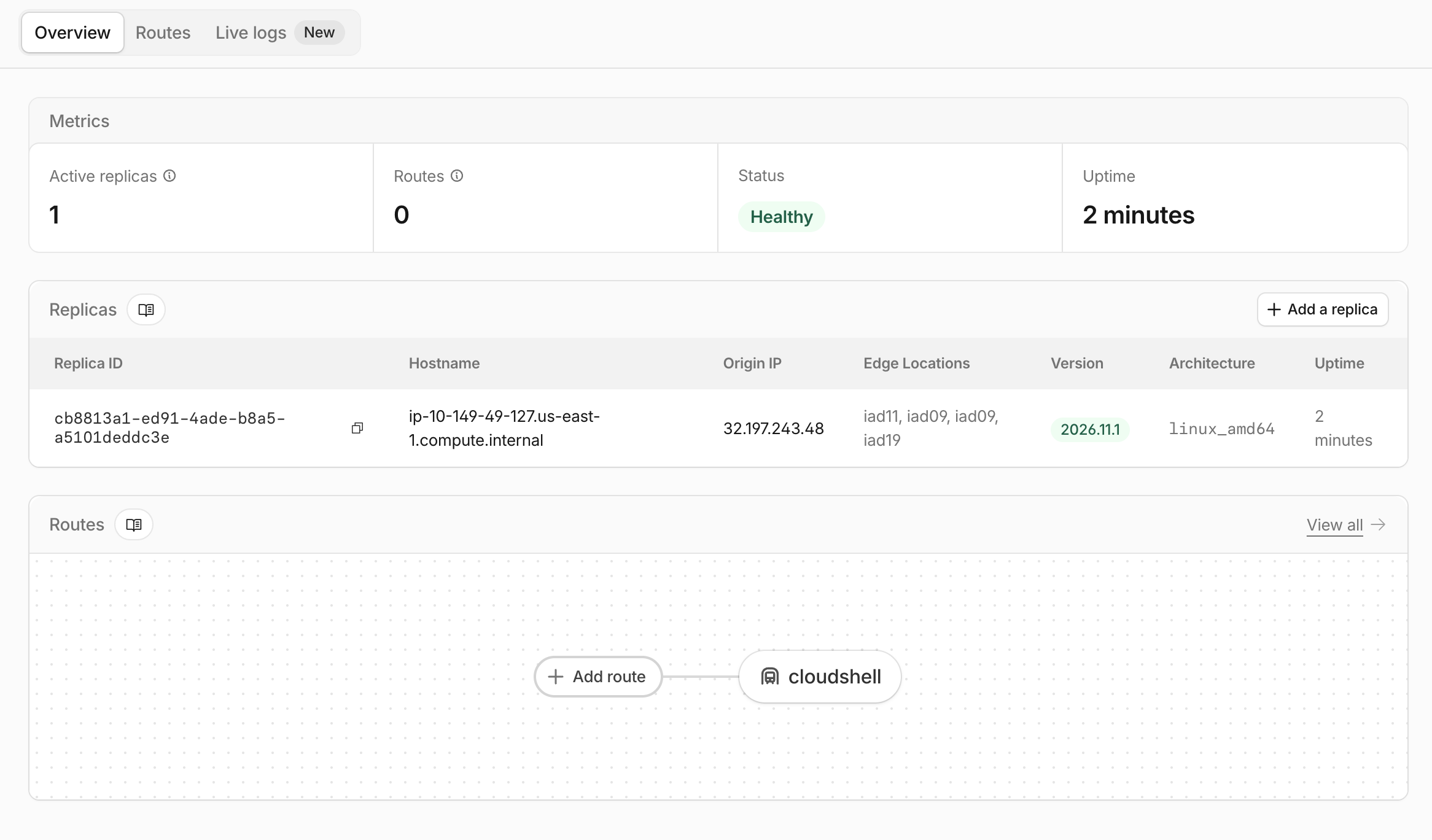
Once you add the route in the dashboard, the tunnel publishes sshd as cloudshell.kubernetes-security.cloud, and SSH from the local machine reaches the container without a public port:
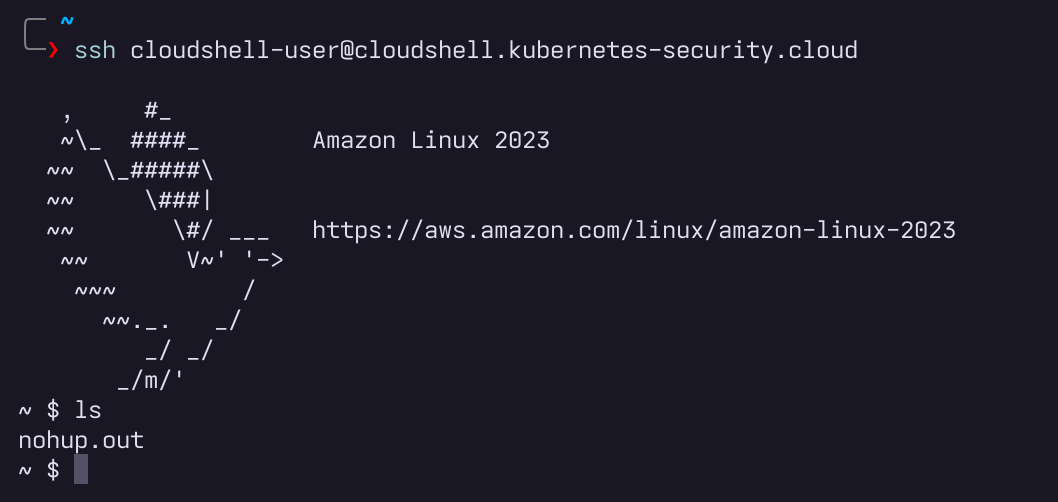
Cloudflare Tunnel is a common technique threat actors use when they want to exfiltrate data into their own infrastructure. Are you thinking what I am thinking?
If we can spin up CloudShell without opening the console, we get a disposable machine and leave no console-side trace. To do that we need to know how CloudShell actually works behind the scenes. Plenty of references already cover it, so I keep it short here.
Earlier, the process meant intercepting requests yourself, after logging in to the console and clicking the CloudShell icon at the top. That is not necessary now. We can plug the DevTools MCP into our agent and let it show where each request goes while CloudShell starts.
Behind the CloudShell
If you move your cursor over the CloudShell icon, you might notice a request goes to a different AWS endpoint.

The URL gives away two things. The origin inside the blob is the account-scoped console host, <account id>-<suffix>.<region>.console.aws.amazon.com, so it names the account and the region even offline. The path is a random UUID. I do not know what it maps to, so I leave it in.
1. Get the First Code
Nothing happens on the console origin before this. The page loads with oauthStart=1795340452864, an epoch timestamp, and immediately bounces you to signin, even though you are already logged in and the console holds your cookies.
GET https://us-east-1.signin.aws.amazon.com/oauth
?client_id=arn:aws:signin:::console/scallop
&code_challenge=YJTadzTLEwHIxjb0qx...
&code_challenge_method=SHA-256
&response_type=code
&redirect_uri=https://us-east-1.console.aws.amazon.com/cloudshell/home
?ca-oauth-flow-id=22a7&isauthcode=true&oauthStart=1795340452864
®ion=us-east-1&state=hashArgsFromTB_us-east-1_6f5f05a6ce21b970The client is the console’s own, arn:aws:signin:::console/scallop, and the challenge is a SHA-256 hash, which means the verifier stays in the page. In state you can read the token broker prefix, the region and a 16 character suffix.
The challenge is not opaque. Take the verifier that shows up in step 6, hash it with SHA-256, encode that digest base64url, and you get exactly the kind of value sitting in code_challenge:
verifier   CwVALu-6pLQvlKnmInxcUN7Rh_tvqdAKcHsLaglNGtw   43 characters
challenge  S21FE5TenfV3Ax0aW3iacj96EMWfOioxLVt53LNfIUI   43 characters
Forty-three characters every time, drawn from A-Z, a-z, 0-9, - and _, with no = padding, because 32 bytes of digest encode to exactly that. The value in the request above is shortened here. The real one fills all 43.
Signin answers with a 302 whose code runs 1747 characters and opens with eyJ6aXAiOiJERUYi. Decode those 16 characters as base64url and you get {"zip":"DEF", the first field of a JWE header. The capture stops there, but the AuthCode in step 9 is long enough to decode the whole header:
eyJ6aXAiOiJERUYiLCJlbmMiOiJBMjU2R0NNIiwiYWxnIjoiZGlyIn0
{"zip":"DEF","enc":"A256GCM","alg":"dir"}
So the payload is DEFLATE-compressed, encrypted with AES-256-GCM, and the content key goes in directly instead of being wrapped. Whatever is inside, the page cannot read it. None of this reaches CloudTrail, because nothing here calls an AWS API for the account yet.
2. Trade the Code for Keys
POST https://us-east-1.console.aws.amazon.com/cloudshell/tb/creds
(no body)

{"accessKeyId":"AKIA...","secretAccessKey":"...","sessionToken":"..."}
The token broker takes the pending code and gives back an access key, a secret and a session token. Every call after this one is signed with them.
One header is odd. x-csrf-token carries a JSON blob, and replaying the request with the captured headers still returns 400. The reply says nothing about what those keys can reach. The sections at the end work that out. The broker call leaves no CloudTrail event either, since it runs on the console origin rather than as a CloudShell API call.
3. Find the Environment
POST https://cloudshell.us-east-1.amazonaws.com/describeEnvironments

{"Environments":[{"EnvironmentId":"d73695e4-acca-4276-8417-295527244117"}]}
describeEnvironments is signed with the keys from step 2, and every call after it carries that environment id, so nothing works without it. On a brand new account you get an empty list instead, and then the page calls createEnvironment, one of the nine operations the service exposes. That call fired once, on my first visit. After an environment existed, the page stopped asking for one. CloudTrail logs this step as DescribeEnvironments with the browser user agent, and the event carries no request parameters.
4. Wait for RUNNING
POST https://cloudshell.us-east-1.amazonaws.com/getEnvironmentStatus
{"EnvironmentId":"d73695e4-acca-4276-8417-295527244117"}

{"Status":"RUNNING","EnvironmentId":"d73695e4-acca-4276-8417-295527244117","StatusReason":null}
getEnvironmentStatus is a poll, and on a running environment it answers RUNNING straight away. Mine took three calls in under two seconds before the page moved on.
When the environment is asleep, the same poll carries the wait. It reports SUSPENDED first, then RESUMING four times across about twelve seconds, and only then RUNNING. Nothing else in the flow takes that long.
Skip the wait and CreateSession fails with InvalidStatusException: Expected the environment status to be in RUNNING. startEnvironment is what kicks the sequence off, and after that the page just keeps polling until RUNNING appears.
CloudTrail logs every poll as GetEnvironmentStatus with the environment id, so a wake leaves a run of them a second or two apart. startEnvironment shows up as StartEnvironment.
5. Open the Tab Session
POST https://cloudshell.us-east-1.amazonaws.com/createSession
{"EnvironmentId":"d73695e4-acca-4276-8417-295527244117",
 "SessionType":"TMUX","TabId":"0ac59281-9693-4946-a64b-cda8ed5f0023"}

{"SessionId":"1795339220186700431-hg9artab7b5hq39zlkr5cpp4cu",
 "StreamUrl":"wss://ssmmessages.us-east-1.amazonaws.com/v1/data-channel/1795339220186700431-...?X-Amz-Algorithm=..."}
The console asks for two sessions. The first is TMUX with a TabId attached, the one the terminal tab will use. The second is EXTENSIONS_BRIDGE, created with no tab at all, and the wire never shows what it is for. The reply to the TMUX call carries a SessionId, the epoch in milliseconds with a random suffix, and a presigned websocket in StreamUrl.
So the console’s tabs run on TMUX, and ps shows it. A console session leaves tmux, a recovery shell and a Unix socket behind. Both lists are trimmed to the interesting lines.
cloudsh+  180  tmux -l -2 -f /var/lib/amazon/cloudshell/tmux.conf new-session -A -D -s 9174f212-… test -x /var/lib/amazon/cloudshell/recovery-shell.sh
cloudsh+  186  /usr/bin/nc -U /tmp/webapp
cloudsh+  195  /bin/bash /var/lib/amazon/cloudshell/recovery-shell.sh
A BASH session made from boto3 leaves none of that. The startup chain is the same (on-container-launch.js, docker through sudo, containerd, extensions-bridge), but the session itself is only a login shell per connection:
cloudsh+  216  bash -l   pts/0
cloudsh+  243  bash -l   pts/1
cloudsh+  298  bash -l   pts/2
So a BASH session never shows up as a tab, because nothing inside the box starts tmux for it.
Follow that StreamUrl and you leave the CloudShell API behind.
ssmmessages is a name you might already know from Session Manager. It is the data channel aws ssm start-session opens for a managed instance, and Session Manager governs it with IAM permissions that share the name, ssmmessages:CreateDataChannel and ssmmessages:OpenDataChannel. CloudShell mints the session and then hands the bytes to SSM, so the cloudshell.<region>.amazonaws.com API only ever deals with control plane calls.
CreateSession appears in CloudTrail with SessionType TMUX and the TabId. The bridge session follows as a second CreateSession in the same second, that one with no TabId at all.
6. Ask for a Second OAuth
GET https://auth.cloudshell.us-east-1.aws.amazon.com/oauth
  ?EnvironmentId=d73695e4-acca-4276-8417-295527244117
  &codeVerifier=CwVALu-6pLQvlKnmInxcUN7Rh_tvqdAKcHsLaglNGtw
  &redirectUri=https://auth.cloudshell.us-east-1.aws.amazon.com/callback.js?state=b544...
  &X-Amz-Algorithm=AWS4-HMAC-SHA256&X-Amz-Expires=900&X-Amz-SignedHeaders=host&X-Amz-Signature=...
A presigned GET for the cloudshell service, valid for 900 seconds, with the environment id and the verifier in the query string.
The verifier that stayed inside the page in step 1 is out in the open now, and that is how PKCE is meant to work. The hash goes first, the preimage follows once there is a code to redeem. The signature covers the query string, so nobody can swap the verifier for their own without breaking it.
The host is neither the console nor the CloudShell API. auth.cloudshell.<region>.aws.amazon.com is a front end built for this service, and it wants a signature plus a verifier instead of a console cookie, which means anyone holding the broker keys can reach it. The 302 it returns is what sends the page into the second OAuth, the leg that step 7 finishes.
I found no CloudTrail event for this call. The auth host sits outside the account trail.
7. Get the Second Code
Signin is the authorization endpoint, and the 302 from step 6 is what sends the browser here. This request is signed for signin itself, which is unusual. An authorization request normally carries a console cookie and nothing more, while this one has to prove it holds the broker keys before signin will answer with a code.
The client id changes as well, from console/scallop to console/scallop-shell. One asks for the first code, the other for this one, and I could not find documentation for why the two are separate.
The reply is another 302, this time back to callback.js?state=b544...&code=..., and the code is 1761 characters instead of 1747. The state in that URL is the value step 6 put in redirectUri, which is what matches a reply to the request that opened it. Signin is outside the account trail too, so this request leaves nothing in CloudTrail.
8. Post the Code Back
callback.js is not a page you can open. Ask for it without a code and the service answers 400 in JSON with an x-amz-apigw-id header, so the route runs behind API Gateway instead of serving a static file.
It does one thing. It compares window.origin against an allowlist of suffixes, and if the caller is on it, the script posts the code to the console tab. That check is what keeps the code out of any page that did not start the flow.
The code arrives by message rather than by navigation, so it never renders and never lands in browser history. callback.js produces no CloudTrail event, and the code itself never shows up in one.
9. Redeem the Code
POST https://cloudshell.us-east-1.amazonaws.com/redeemCode
{"EnvironmentId":"d73695e4-acca-4276-8417-295527244117",
 "AuthCode":"eyJ6aXAiOiJERUYiLCJlbmMiOiJBMjU2R0NNIiwiYWxnIjoiZGlyIn0..wTy6...",
 "CodeVerifier":"...43 characters...",
 "RedirectUri":"https://auth.cloudshell.us-east-1.aws.amazon.com/callback.js?state=b544..."}

{"RefreshToken":"eyJ6aXAiOiJERUYi...483 characters"}
It sends the code as a JWE, the same verifier from step 6, the redirect and the environment. One RefreshToken comes back, also a JWE, 483 characters.
The name promises a refresh token. Its payload is encrypted, so there is no expiry to read, and I never measured how long one lasts. How long it stays valid is not written down anywhere I could find.
CloudTrail records this step as RedeemCode, with CodeVerifier set to *** while the environment id and RedirectUri stay in the clear.
10. Push the Token
POST https://cloudshell.us-east-1.amazonaws.com/putCredentials
{"EnvironmentId":"d73695e4-acca-4276-8417-295527244117",
 "RefreshToken":"eyJ6aXAiOiJERUYi...1488 characters",
 "KeyBase":"vrvCtG+Dt68306XbdXhcca4oQjDDhQ1FcT68vSPQAQ8="}

{}
An empty reply. KeyBase is 32 bytes of base64, nobody documents what it binds to, and the only thing I can defend is that it travels with the token.
The effect turns up at port 1338. That credential endpoint answers 500 in an API-created session until a token lands in the box, and after the console flow the session has credentials without the browser handing them over twice.
CloudTrail calls this one PutCredentials. RefreshToken is ***, KeyBase is *** when it appears, and some of my events add SignInVersion prism.
11. Attach the Terminal
The socket takes a fixed set of parameters and does not stay valid for long.
wss://ssmmessages.us-east-1.amazonaws.com/v1/data-channel/1795339612922822278-h6j7bqtepzys9rtd3f8i2rbn28
  ?X-Amz-Algorithm=AWS4-HMAC-SHA256
  &X-Amz-Credential=AKIA.../20261122/us-east-1/ssmmessages/aws4_request
  &X-Amz-Date=20261122T100348Z
  &X-Amz-Expires=60
  &X-Amz-Security-Token=...712 characters...
  &X-Amz-Signature=...
  &X-Amz-SignedHeaders=host
  &cell-number=...336 characters...
&role=publish_subscribe| Parameter | Value in my capture |
|---|---|
X-Amz-Algorithm | AWS4-HMAC-SHA256 |
X-Amz-Credential | access key, date, region, ssmmessages, aws4_request |
X-Amz-Expires | 60 seconds |
X-Amz-SignedHeaders | host |
X-Amz-Security-Token | the session token, 712 characters |
cell-number | an opaque 336 character value |
role | publish_subscribe |
The path repeats the session id, so there is one socket per session. The expiry is 60 seconds, which leaves the client a minute to open it once createSession returns, and both the console and my client connect straight away.
The authorization has to sit in the query string, because a browser cannot set headers on a websocket handshake, and SignedHeaders=host is all it can send. The scope in my capture is us-east-1/ssmmessages, not cloudshell.
I opened a fresh URL to see what would come next. There was no subprotocol in the handshake, and nothing came back for eight seconds, which tells me the server says nothing until the client talks. The client that knows the words is session-manager-plugin, which is why the CLI goes through the plugin instead of reimplementing the conversation. role is documented, at least by example. The StartSession API reference ships a StreamUrl ending in role=publish_subscribe. cell-number never shows up in the docs, but the plugin’s resume test swaps OLD_EXPIRED_CELL for NEW_FRESH_CELL, which reads like the cell that holds the session.
Close the tab and the page calls deleteSession, which is the DeleteSession event. I also saw one for an old id on a later page load, so stale sessions get cleaned up on the next visit. The socket never reaches CloudTrail itself. What the trail shows instead is SendHeartBeat every minute or two while the tab stays open.
Everything above produces one session, and the environment is what stays behind. describeEnvironments came back with three ids in us-east-1, one for each principal I had used.
| Environment | Identity that used it |
|---|---|
d73695e4-acca-4276-8417-295527244117 | federated user from a console session |
707452e2-46a5-4dab-8bc1-f594dc7b08b4 | IAM user used by the CLI |
1634cf1d-cbd6-4b4c-ac36-0c152468aedc | root, from a normal browser session |
Three ids, three principals, and no crossover. The console never offered me my IAM user’s environment, and the CLI never handed me the console’s. That’s as far as the captures go. Two sessions sharing one environment is something I never tried.
Nothing here can be reused. Both codes are encrypted JWEs, so the page can only hand back a blob it has never read. Replay the step 2 exchange with the captured headers and you still get a 400. The step 6 grant is good for 900 seconds, the verifier only travels inside a signed URL, and the callback turns away any origin that is not on its list. Even the token arrives bound to a 32 byte KeyBase.
The Same Service Without the Console
boto3 1.44.9 ships a cloudshell client. boto3.client("cloudshell", region_name="us-east-1") builds, describe_environments() answers with the environment id, and nothing has to be hand-rolled for the API path. The service speaks rest-json with nine operations.
DescribeEnvironments   CreateEnvironment   GetEnvironmentStatus
StartEnvironment       StopEnvironment     DeleteEnvironment
CreateSession          DeleteSession       SendHeartBeat
So a shell takes two calls, and neither needs steps 1, 2, 6, 7, 8, 9, 10 or 11.
{"EnvironmentId":"707452e2-46a5-4dab-8bc1-f594dc7b08b4","SessionType":"BASH"}SessionType is where the two paths part, since the console sends TMUX with a TabId while the API takes BASH with none at all. Either way the reply carries a presigned StreamUrl to an SSM data channel, and session-manager-plugin speaks it.
Inside that session, whoami answers cloudshell-user and aws sts get-caller-identity gives back arn:aws:iam::389261376622:user/Administrator. That ARN is my IAM user’s because I exported my local credentials into the session. So the shell runs as cloudshell-user while the credentials are mine.
The client behind all of this is one small Python file I had my coding agent write, and it sits at github.com/myugan/aws-cloudshell. It wraps the nine operations, exports local credentials only when asked, and hands the data channel to session-manager-plugin instead of reimplementing it.
The Console Adds Credentials, Not Access
Run env in a session made through the API and the endpoints it hands the shell are local:
AWS_CONTAINER_CREDENTIALS_FULL_URI=http://localhost:1338/latest/meta-data/container/security-credentials
AWS_CONTAINER_AUTHORIZATION_TOKEN=j3JIqk9E…
CLOUDSHELL_PRIVATE_IPV4=10.139.190.202
__MDE_ENV_API_AUTHORIZATION_TOKEN_FILE=/aws/mde/.mde_env_api_auth_token
__MDE_ENV_API_AUTHORIZATION_TOKEN=mC5Fk3AV…
__MDE_ENVIRONMENT_API=http://localhost:1339
__MDE_ENVIRONMENT_ID=e-f028012ceb694144b0c2c76a666c4295
MDE_PRIVATE_IPV4=10.139.190.202
Two services, both on loopback. 1338 is the credential endpoint the AWS CLI asks. 1339 is __MDE_ENVIRONMENT_API, a second internal API with its own bearer token file and its own environment id (e-…), and neither port is reachable from outside the container. The first one only answers once the console has pushed a refresh token into the box, which is step 10.
To see what the endpoint does without the console, I made a BASH session from boto3. create_session hands back a SessionId, a TokenValue and a StreamUrl, and those three together are what session-manager-plugin needs. The StreamUrl is a presigned websocket of about 1,600 characters, so the script writes the response to a file rather than printing it:
import boto3, json

cs = boto3.client("cloudshell", region_name="us-east-1")
env = cs.describe_environments()["Environments"][0]["EnvironmentId"]
session = cs.create_session(EnvironmentId=env, SessionType="BASH", QCliDisabled=True)

json.dump({k: session[k] for k in ("SessionId", "TokenValue", "StreamUrl")}, open("/tmp/session.json", "w"))
Then the plugin takes that file whole, full URL and token included, and turns it into a shell. Nothing was pushed into this one, and my own credentials stayed outside:
$ session-manager-plugin "$(cat /tmp/session.json)" us-east-1 StartSession
Starting session with SessionId: 1795436445291525928-azrxcknol5r35dfnf7vfh8e32a
~ $ aws sts get-caller-identity
aws: [ERROR]: Error when retrieving credentials from container-role: Error retrieving metadata: Received non 200 response 500 from container metadata: <?xml version="1.0" encoding="iso-8859-1"?>
<!DOCTYPE html PUBLIC "-//W3C//DTD XHTML 1.0 Transitional//EN"
	"http://www.w3.org/TR/xhtml1/DTD/xhtml1-transitional.dtd">
<html xmlns="http://www.w3.org/1999/xhtml" xml:lang="en" lang="en">
 <head>
  <title>500 - Internal Server Error</title>
 </head>
 <body>
  <h1>500 - Internal Server Error</h1>
 </body>
</html>
With both variables set, the CLI knows where to ask. It reads AWS_CONTAINER_CREDENTIALS_FULL_URI, sends a GET there with AWS_CONTAINER_AUTHORIZATION_TOKEN as a bearer header, and gets a 500 with an HTML page where JSON was expected. The token gets the request past the door. What is missing sits behind it. No refresh token was pushed into this session, so the server on 1338 has no credentials to hand back and answers with an error page. That ends the lookup, and nothing retries against instance metadata, so the command exits instead of falling back.
Only a few things differ between the console and API paths:
| Console | boto3 | |
|---|---|---|
| Session type | TMUX plus EXTENSIONS_BRIDGE | BASH |
| Inside the box | tmux, recovery shell, nc socket | bash -l per connection |
| Tab in the UI | yes | none |
| Port 1338 | served once putCredentials lands | 500, nothing pushed |
| CloudTrail | CreateSession, RedeemCode, PutCredentials, SendHeartBeat | no RedeemCode, no PutCredentials, BASH session |
sessionCredentialFromConsole | true | absent |
| user agent | Chrome | Boto3/1.44.9 |
Only one row in that table changes what you can do. tmux or bash -l changes nothing but the screen, and the container starts the same way in both cases. The exception is the credential endpoint on port 1338, the one env pointed at. The console leaves a token there for it to answer with, and an API session leaves it empty. Bring your own credentials and the box reaches just as far.
Why It Makes a Good Exfil Target
Now that we have some understanding of how AWS CloudShell works behind the scenes, the idea from the start is to use it as a target that receives exfiltrated data from any target, without standing up a new workload like EC2 just to catch it. You use your own AWS account, spawn a temporary CloudShell to receive the data, then forward it on to other infrastructure when you need to. That keeps the path hard to follow, and you can do it per region, since the service limits say how much temporary capacity AWS hands out.
CloudShell exposes no port to the internet, so the connection has to start from inside the box. The cloudflared tunnel from earlier does exactly that. The connector runs inside the shell, the tunnel publishes sshd on a hostname you own, and a target can then scp or curl -T straight into the container. The bytes land on the box, and no port in your account ever faced the internet to receive them.
Remember that CloudShell inherits the permissions of whoever authenticated it, so you can create a limited principal just to spawn it, give that principal S3 access, and forward the data without configuring any AWS secret key, because the credentials attach to the shell themselves.
The principal does not need much. AWSCloudShellFullAccess covers it with cloudshell:*, but a narrower policy is a single statement, and this one works.
{
  "Version": "2012-10-17",
  "Statement": [
    {
      "Sid": "DriveCloudShellFromTheApi",
      "Effect": "Allow",
      "Action": [
        "cloudshell:DescribeEnvironments",
        "cloudshell:CreateEnvironment",
        "cloudshell:GetEnvironmentStatus",
        "cloudshell:StartEnvironment",
        "cloudshell:StopEnvironment",
        "cloudshell:CreateSession",
        "cloudshell:DeleteSession",
        "cloudshell:SendHeartBeat",
        "cloudshell:DeleteEnvironment"
      ],
      "Resource": "*"
    }
  ]
}
That set drives a shell from the API, and the console route needs two more, cloudshell:RedeemCode and cloudshell:PutCredentials. DeleteEnvironment is in there because an environment belongs to the principal that created it, and without that permission the user leaves environments behind that even the account admin cannot remove. If you hit a permission that is missing, add it to the policy.
CloudTrail Events
A week of my own use logged these events, and no others:
| Event | requestParameters | userAgent |
|---|---|---|
DescribeEnvironments | none | browser |
CreateEnvironment | none | browser |
GetEnvironmentStatus | EnvironmentId | browser |
StartEnvironment | EnvironmentId | browser |
CreateSession | SessionType TMUX, TabId | browser |
CreateSession | SessionType EXTENSIONS_BRIDGE | browser |
CreateSession | SessionType BASH | Boto3/1.44.9 |
RedeemCode | CodeVerifier ***, AuthCode ***, KeyBase ***, EnvironmentId, RedirectUri | browser |
PutCredentials | EnvironmentId, RefreshToken ***, KeyBase *** or SignInVersion prism | browser |
DeleteSession | SessionId, EnvironmentId | either |
SendHeartBeat | EnvironmentId | browser |
SessionType is one of the request parameters, so the call itself tells TMUX, EXTENSIONS_BRIDGE and BASH apart. What it never carries is command output, because CloudTrail records the call and stops.
What to Watch For
A console tab and the boto3 client do not produce the same set of events.
| Event | Console tab | boto3 client, no console |
|---|---|---|
PutCredentials | at login, then roughly every 7 minutes | never |
RedeemCode | once per OAuth round trip | never |
CreateSession | TMUX, plus EXTENSIONS_BRIDGE in the same second | BASH, with QCliDisabled |
| user agent | Chrome | Boto3/1.44.9 |
SendHeartBeat | while the tab stays open | while a session stays open |
GetEnvironmentStatus | a few polls per visit | polls around each session |
DeleteSession | also removes stale ids, hence InvalidStatusException | every delete succeeded |
Four of those rows separate the routes. They are PutCredentials, RedeemCode, CreateSession and the user agent. The rest are common ground. The hover leaves no trace for either side.
A real CreateSession, with only my address and the long URL changed:
{
  "eventVersion": "1.11",
  "userIdentity": {
    "type": "Root",
    "arn": "arn:aws:iam::389261376622:root",
    "accountId": "389261376622"
  },
  "eventTime": "2026-11-23T12:30:31Z",
  "eventSource": "cloudshell.amazonaws.com",
  "eventName": "CreateSession",
  "awsRegion": "us-east-1",
  "sourceIPAddress": "203.0.113.7",
  "userAgent": "Mozilla/5.0 (Macintosh; Intel Mac OS X 10_15_7) AppleWebKit/537.36 (KHTML, like Gecko) Chrome/157.0.0.0 Safari/537.36",
  "requestParameters": {
    "EnvironmentId": "1634cf1d-cbd6-4b4c-ac36-0c152468aedc",
    "SessionType": "TMUX",
    "TabId": "b01ae4b5-17bb-4c6b-8ad2-7fbd38da77c2"
  },
  "responseElements": {
    "EnvironmentId": "1634cf1d-cbd6-4b4c-ac36-0c152468aedc",
    "SessionId": "1795436811385273284-y9fkrjpr86f8be7fhrvt842dlq",
    "StreamUrl": "wss://ssmmessages.us-east-1.amazonaws.com/v1/data-channel/1795436811385273284-...?X-Amz-Expires=60&...",
    "TokenValue": "..."
  },
  "sessionCredentialFromConsole": "true",
  "readOnly": false,
  "eventCategory": "Management"
}
sessionCredentialFromConsole is true on every console event I pulled and missing from the Boto3 ones, which separates console from API more cleanly than the user agent does. responseElements is the other surprise. It keeps the presigned StreamUrl together with its TokenValue, so the trail holds a data channel URL with credentials attached, short lived or not.
The same call from a client of mine carries no sessionCredentialFromConsole at all:
{
  "eventTime": "2026-11-22T11:26:53Z",
  "eventSource": "cloudshell.amazonaws.com",
  "eventName": "CreateSession",
  "sourceIPAddress": "203.0.113.7",
  "userAgent": "Boto3/1.44.9 md/Botocore#1.44.9 ua/2.1 os/macos#27.2.0 md/arch#arm64 lang/python#3.15.2 md/pyimpl#CPython cfg/retry-mode#standard Botocore/1.44.9",
  "requestParameters": {
    "EnvironmentId": "707452e2-46a5-4dab-8bc1-f594dc7b08b4",
    "SessionType": "BASH",
    "QCliDisabled": true
  },
  "responseElements": {
    "EnvironmentId": "707452e2-46a5-4dab-8bc1-f594dc7b08b4",
    "SessionId": "1795342815976488350-dkn2ni57y7g2bisrrg3uzqyuqq",
    "StreamUrl": "wss://ssmmessages.us-east-1.amazonaws.com/v1/data-channel/1795342815976488350-...?X-Amz-Expires=60&...",
    "TokenValue": "..."
  }
}
One console event of mine came from a headless browser instead of a real tab. The HeadlessChrome token in the user agent was the only difference.
The user agent is weak evidence. A client sends whatever string it likes, and boto3 even lets you set it, so Boto3/1.44.9 only suggests a script. SessionType is a request parameter as well, so a custom client can ask for TMUX and pass for a tab. What a script cannot produce is RedeemCode or PutCredentials, since both need a real code and token from the browser flow.
A rule that requires PutCredentials or RedeemCode will never fire against the script, since neither event occurs there. What you can rely on is CreateSession, which both routes leave, plus the fields as hints. Missing RedeemCode and PutCredentials is worth an alert by itself, because it means the console was never involved, whatever the user agent says.
Reference
- Deep dive into AWS CloudShell covers the container itself, including the privileged mount and the credential server on port 1338.
- CloudShell Design (AWS) maps the control-plane flow, from caller identity to the REST-to-WebSocket pivot.
- AWS CloudShell has a hidden API, here is how to use it with boto3 reaches the same control plane from boto3 instead of the console.